
PC cases were invented 40 years ago for office work — not gaming. This is how airflow and thermals actually work, where the standard rectangular design fights the air, and what happens when you build a case around the physics instead.
Your PC case was never invented for gaming.
It was invented roughly 40 years ago for office work. The engineers who designed it had three problems to solve: make it cheap to manufacture, make it hold the components, make it fit under a desk. That's it. Nobody was thinking about heat dissipation under sustained gaming load, because gaming as we know it didn't exist yet.
So here's the question that started everything for us: how can something invented for one job decades ago be the best solution to a problem that didn't even exist yet?
We don't think it can. Let us walk you through why (with some quick pointers on how airflow and thermals actually work).
Sources that back the 1980s office-origin and form-factor history
PC cases are rectangular because the shape was cheap to stamp out of sheet metal, not because it was good at cooling. The tower PC as we know it traces back to the early 1980s: IBM's PC era, when personal computers were office machines. The rectangle wasn't an engineering insight. It was a manufacturing convenience. Sheet metal bends at right angles. Assembly lines love repeatable shapes. And the thing had to fit under or beside a desk without getting in anyone's way.
Nobody sat down and said, “a rectangular box is the optimal enclosure for computing hardware.” They said, “this is the cheapest shape to stamp out of metal, and it works well enough.” The rectangular case exists because it was practical, not because it was optimal.
Sources that back "manufacturing convenience, not optimisation"
Yes. Enormously. And credit where it's due.
Over the past four decades, some of the best engineers in consumer hardware have worked relentlessly to make the rectangular PC case better. Materials improved, from flimsy steel to tempered glass and aluminum. Airflow got more sophisticated: mesh fronts replaced solid panels and fan configurations became more optimal. Cable management went from an afterthought to a discipline of its own.
These weren't cosmetic changes. Better mesh panels genuinely move more air. Better fan placement genuinely reduces heat. The people who built these improvements were solving real problems, and they solved them well.
But every one of those improvements happened inside the box. Nobody questioned the box itself. The shape, the fundamental geometry that determines how air enters, moves, and exits, stayed exactly the same.
Forty years of terrific engineering, but all from the same misguided starting point.
Sources that back "mesh fronts and panel design genuinely move more air"
Before we get into what's wrong with the rectangle, it helps to understand what airflow is actually doing in the first place.
Think about blowing on a hot spoonful of soup. You're not making the soup cold. You're moving the hot air sitting directly above it out of the way and replacing it with cooler air. The soup cools because the heat has somewhere to go. Stop blowing, and the hot air stagnates right above the surface, acting as insulation. The soup stays hot.
Your PC works exactly the same way. Your CPU and GPU generate heat. The fans in your case move air across those components, carrying that heat away and replacing it with cooler air from outside the case. The moment airflow stops or slows, heat builds up. The components sit in their own warmth.
What we're describing is convective cooling, heat transfer driven by fluid (air) movement. The rate of cooling depends on the temperature difference between your components and the incoming air (delta-T), the volume of air moving across the surface, and the path that air takes. Air naturally follows the path of least resistance. If that path doesn't cross your hottest components, those components don't benefit from the airflow at all.
Sources that back convective cooling, delta-T, and the boundary-layer "air must reach the surface" point
Fair question. If your rig runs stable, boots every game you throw at it, and hasn't caught fire, why does any of this matter?
Four reasons.
Performance. Modern CPUs and GPUs are designed to protect themselves from heat by slowing down, a mechanism called thermal throttling. When your chip hits a temperature threshold, it pulls back its clock speed to reduce heat output. That performance drop happens automatically, silently, and continuously. If your CPU is running hot, you may already be losing the performance headroom you paid for. Cooler temps mean sustained boost clocks, not theoretical ones, but the actual speeds your chip is capable of under load.
Noise. Your fans don't run at full speed for fun. They spin harder when temps climb, and harder spinning fans are louder fans. Better airflow (air that actually moves heat out efficiently) means your fans don't have to work as hard. That's a quieter machine as a direct result of better thermal management.
Less turbulence. Fans fighting to move air through a chaotic path create turbulence. Turbulence creates noise, not the clean white noise of a fan at speed, but the irregular whoosh and whine of air hitting obstacles and bouncing. Smoother airflow paths mean smoother, quieter airflow.
Lifespan. This one is backed by physics. There's a principle in electronics reliability derived from the Arrhenius equation that describes how temperature affects how long components last. The rule of thumb: every 10°C reduction in operating temperature roughly doubles a component's lifespan.
That's a lofty number to reach, and not always very realistic. But even a modest improvement matters. Running 3°C cooler than you otherwise would may translate to roughly 20–25% longer component life, because heat is one of the primary mechanisms of electronic degradation, and it's one of the few factors you actually control.
Think of it like exercise. Going for a run doesn't make you immortal. It doesn't stop you from getting hit by a car tomorrow. But over time, it's the one variable in your health you can actually influence. Temperature is that variable for your hardware.

The Arrhenius equation models the rate of chemical reactions as a function of temperature. Applied to electronics reliability, the rule of thumb is: lifespan ≈ 2^(ΔT/10), where ΔT is the temperature reduction in Celsius. This relationship is strongest for electrolytic capacitors, which are often the first components to fail in aging hardware. For a 3°C reduction: 2^(3/10) ≈ 1.23, roughly a 23% increase in expected lifespan. This is a rule of thumb, not a guarantee, and results vary by component type and operating conditions.
Sources that back thermal throttling + the Arrhenius lifespan rule, including its honest limits
Before we get into the problems, it helps to understand what a well-configured rectangular case is actually trying to do.
The goal is simple: pull cool air in, push hot air out, and route it across your components along the way. In a standard mid-tower, this usually means intake fans at the front and bottom drawing cool air in, and exhaust fans at the rear and top pushing hot air out. The idea is a front-to-back, bottom-to-top flow path: cool air entering, warming as it passes components, and exiting out the back and top where heat naturally wants to rise.
The components doing the most work (and generating the most heat) are typically the CPU near the top-center of the board, the GPU sitting in the middle of the case, and the VRMs around the CPU socket. The PSU usually sits at the bottom with its own intake, isolated from the main airflow path in most modern cases.
In theory, the layout makes sense. In practice, the rectangle makes it harder to execute than it should be.
Sources that back the standard front-to-back / bottom-to-top intake-and-exhaust model
Here's where the rectangle starts working against you.
Have you ever tried leaving a stadium after a big game or concert? There are tens of thousands of people trying to get out, and the exits are at the corners. Everyone funnels toward those corners, and it jams. People bunch up, stop moving, turn back on themselves. The crowd doesn't flow, it mostly stalls.
That's what happens to hot air inside a rectangular case. The sharp 90° corners of the enclosure create dead zones: areas where air pressure drops, flow stalls, and heat accumulates. Air that was supposed to carry heat out of the case gets trapped instead, recirculating in the corners while your components keep generating more.
There's a more specific problem too: hot-air reuse. In a typical rectangular layout, the GPU sits below and in front of the CPU cooler. The GPU exhausts hot air directly upward and backward, straight into the path of the CPU cooler's intake. Your CPU cooler ends up pulling in air that's already been heated by the GPU. In other words, your components breathe each other's used air.
Now, it should be acknowledged that the industry has found a workaround for this: dual- and triple-chamber cases, which partition the interior to try to separate hot and cool airflow paths. This genuinely helps. But notice what it is: a structural patch applied to a shape that was never designed for airflow in the first place. The chambers were invented because air can't be controlled optimally in a rectangle. The very existence of these multiple chambers proves what we laid out at the beginning: this shape is simply not conducive to good airflow.
Then there's bottom intake. Many cases position fans at the bottom of the front panel to maximize intake area. In theory, this is good: more surface area means more potential airflow. In practice, those fans are working against physics.
Picture draining a full sink. The drain pulls water in from a full, even body of liquid: steady, consistent, smooth. Now picture trying to drain a shallow puddle. The drain gets the same pull, but there's far less water available around it. The flow sputters. It's uneven. Some parts of the puddle barely move at all.
Bottom intake fans sit in the puddle. They're pulling hard, but they're competing with each other for a small, partially obstructed volume of air near the floor of the case. The airflow that results is weaker, more turbulent, and less evenly distributed than the fan count would suggest.
Sources that back hot-air recirculation and "multi-chamber cases exist because the rectangle can't control air"
You now know the rules. So let's try a thought experiment.
If you were designing a PC case today from scratch, with everything you just read in your head, where would you start?
Would you draw a rectangle, stuff the components in, and then try to figure out where to squeeze the fans? Or would you look at how the air actually wants to move (straight paths, no sharp corners, intake aimed directly at the heat sources) and then design the shape of the case around that?
That's what we believed. That's where the Octa V1 came from.
The central idea behind the Octa V1 is something we call direct cooling: intake fans positioned to aim airflow straight at the components generating the most heat, with as few obstacles between them as possible.
There's a simple way to understand why this matters.
Try to blow out a candle that's close to your mouth. Easy. Now try it from across the room. You have to blow much harder, and the air spreads and loses energy over the distance. Now try to blow around a corner. Nearly impossible. And if the airflow reaches the candle but hits the base instead of the flame, it doesn't matter how hard you blow. The flame stays lit.
Most rectangular cases, by virtue of their shape, put the candle far from the mouth. Air enters at the front or bottom, travels horizontally across the case, bounces off surfaces, and hopefully reaches the CPU and GPU somewhere along the way. The path is long, the obstacles are real, and the efficiency loss is measurable.
The Octa V1's angular geometry creates intake paths that aim directly at the primary heat sources: short, straight, unobstructed. Air doesn't wander the case looking for somewhere to go. It goes where the heat is.
The three diagrams below use the same scale and visual language, so the contrast reads at a glance: a standard tower, a dual-chamber case, and the Octa V1.
Beyond the intake path, the angled geometry also reshapes how air exits the case. What's the difference between going down a slide and walking down stairs? You cover the same vertical distance either way, but one delivers you to the bottom fast and smooth, while the other is slow and full of stops. The Octa V1's angled exhaust path moves hot air out of the case the way the slide moves you: directly, without unnecessary resistance.
To make that concrete: in the configuration that was independently tested, the Octa V1 runs four intake fans (one 120 mm and three 140 mm) paired with four 140 mm exhausts. The point isn't the fan count; it's the aim. Rather than lining the intakes up in a single front wall and hoping the air finds its way, each one is positioned to feed a specific heat source, so the CPU, the GPU and the memory each get their own stream of fresh air instead of fighting over one. The angled exhaust path then carries that heated air out along the shortest line, the way the slide carried you down, rather than letting it pool in the corners or wash back over the next component.
Sources on the underlying principle (the Octa geometry is our own design): directing flow straight at the heat source, and designing geometry around airflow
This is the part most brands either skip or spin. We'll do neither. The Octa V1 was tested two ways, by two independent European institutes, and the two methods don't measure the same thing, so we'll show you both, and exactly how we read them.
A physical test and a simulation answer different questions. RISE (Research Institutes of Sweden) ran a physical test on real hardware: what actually happened on the bench. FS Dynamics ran a CFD (computational fluid dynamics) simulation: what the geometry does once every variable is held constant. Neither is “the answer” on its own. That's why we commissioned both.
Identical components were moved between three cases, with fans placed equivalently per manufacturer guidance and no dust filters fitted. Each phase ran for ten minutes:
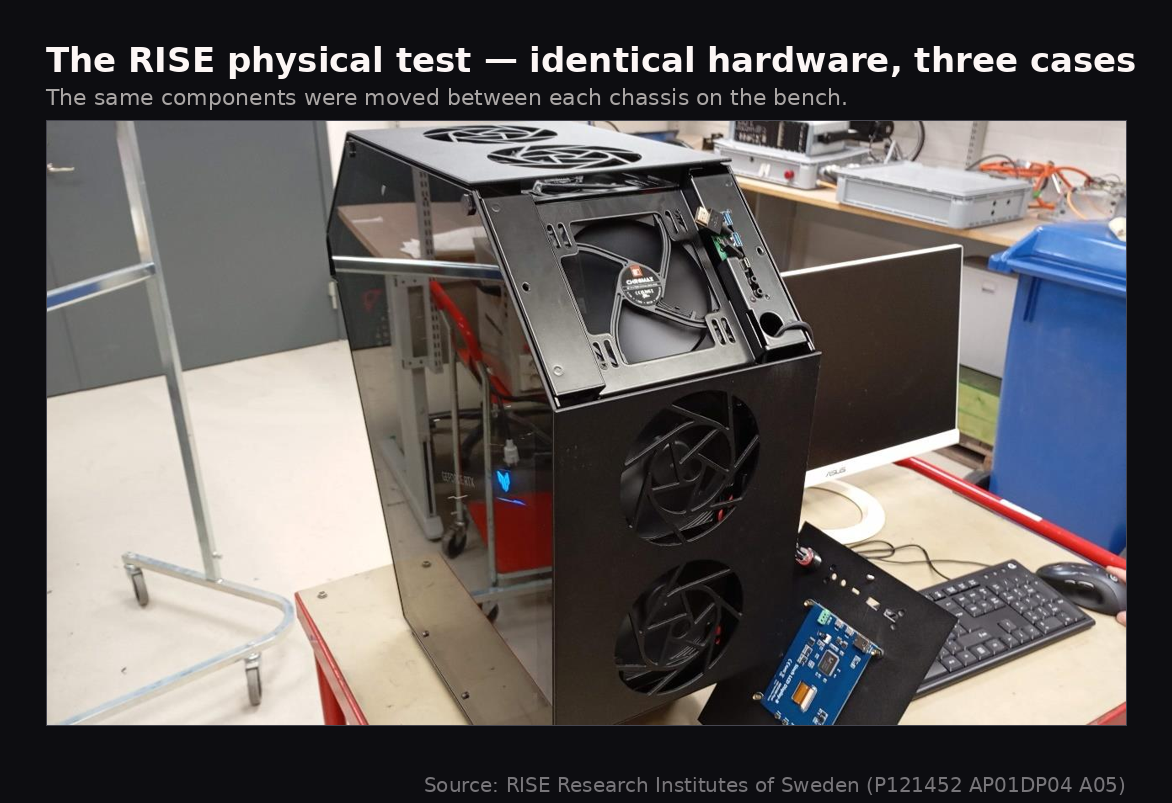
ChassisCPU °C (idle / stress)GPU °C (idle / stress)Cinebench CPUCinebench GPUOlicus Octa V134 / 8829.1 / 43.4159526058Fractal Design Meshify 2 XL35 / 8830.1 / 46.1154326004Corsair 7000D35 / 8931.5 / 45.1154625923
Source: RISE report P121452 AP01DP04 A05, tested 19–20 December 2024. RISE's report lists the Fractal case as “Meshify 2”; the unit tested was the Meshify 2 XL variant.
Read it straight: even in this run, the Octa V1 posts the coolest GPU (43.4 °C, 2.7 °C under the Meshify 2 XL and 1.7 °C under the 7000D), ties the Meshify on CPU and beats the 7000D by 1 °C, and records the highest Cinebench scores of the three. It wins or ties every metric. But notice the duration: ten minutes per phase. That detail changes how you should read the numbers.
Here's our reading, and it is ours, not a conclusion RISE drew. Ten minutes is a transient window. None of the three cases has reached thermal equilibrium in that time; what the table captures is the early heat surge, not the settled gap.
Why does that matter? Physical case tests are full of moving parts. Has the case reached equilibrium? Is a background process running mid-benchmark? Is “50% fan speed” actually 50% on every case, or are there manufacturing tolerances at play? Different cases have different materials, internal volumes, even colours, all affecting how fast they reach steady state. Comparing two cases mid-warmup is like comparing a car that's been driving an hour against one that just started, then declaring “car 1 runs hotter.” You're measuring history, not cooling.
The cleanest way to picture it: two identical 5-litre pots on identical stoves, one with 1 litre of water, one with 4. Come back in ten minutes: the 1-litre pot is boiling, the 4-litre pot reads 55 °C. “Pot 1 heats faster!” is obviously wrong: you measured thermal mass, not the stove. A lot of case-comparison videos are, functionally, pot comparisons.
So we read the RISE table as an early snapshot: the Octa is already ahead before equilibrium, which suggests (it does not prove) that the gap would widen, not close, under sustained load. To see the converged picture, you need a method that runs all the way to steady state. That's the simulation.
CFD runs to convergence, the steady state the ten-minute bench never reaches. Modelling the geometry with controlled inputs, the maximum component temperatures came out like this:
Component (max temp)Reference °COcta V1 °CDifferenceCPU87.471.0−16.4 °C (≈19%)GPU71.857.3−14.5 °C (≈20%)RAM73.264.0−9.2 °C (≈13%)
Source: FS Dynamics report FSD1024294-02-00. Figures are maximum component (cooling-apparatus) temperatures at convergence.
FS Dynamics' own caveats, stated plainly because they're part of the lesson: the reference case was modelled with three inlet fans against the Octa's four, so this isn't purely geometry-versus-geometry; and the figures are the temperature of the cooling apparatus, not the chip your software reports, so the on-screen numbers would differ by less. These don't erase the result. They frame it.
The simulation doesn't just give numbers, it shows you the air. In the temperature field, the reference case glows hot where heat collects; the Octa stays cooler across the board. In the velocity field, you can see the Octa keeping air moving through the component zone instead of letting it stall.
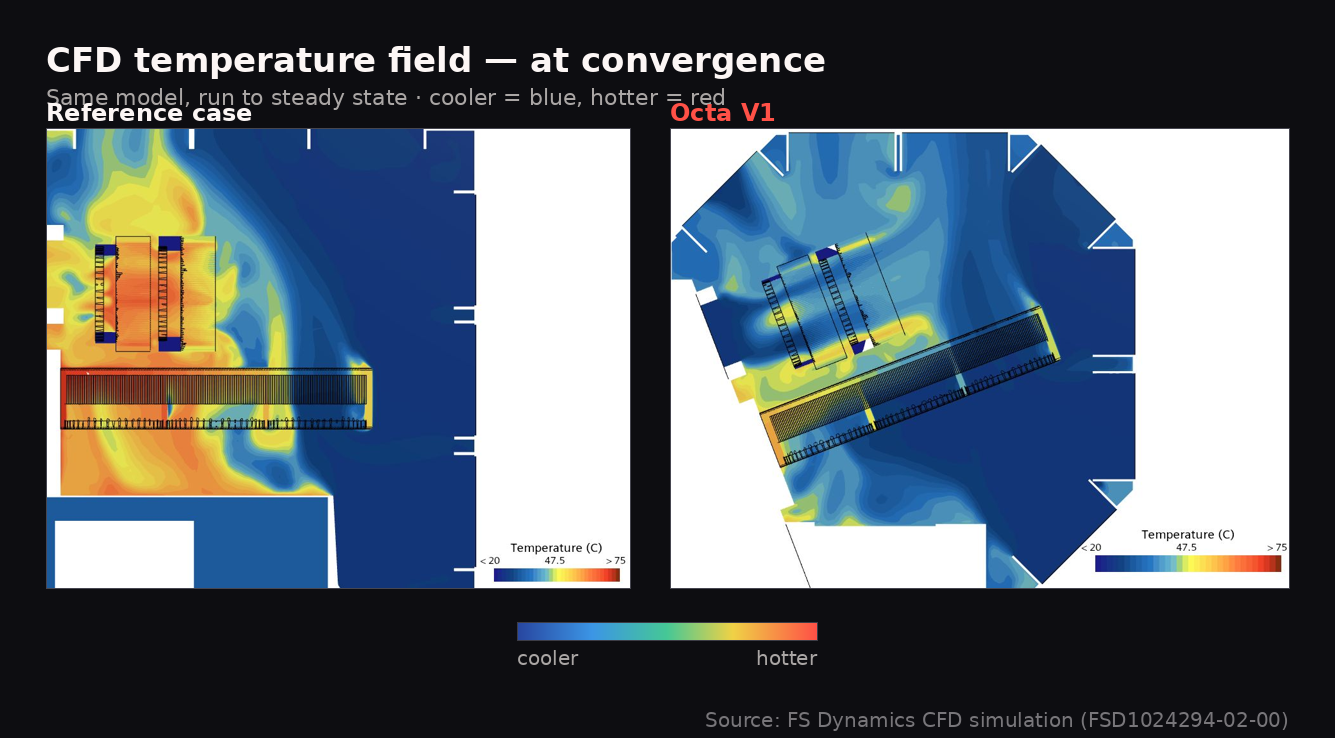
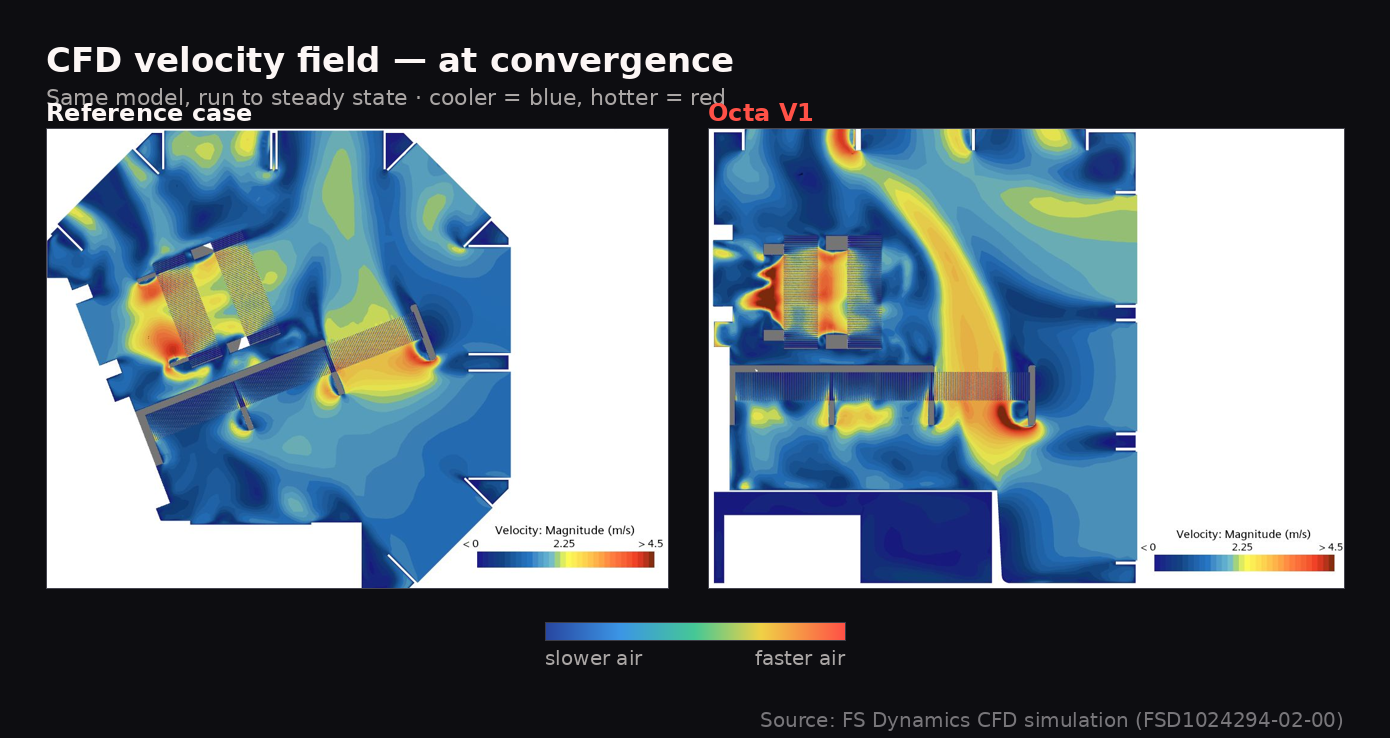
The two methods point the same way: the Octa's geometry moves heat better. The ten-minute bench shows a modest, real lead; the converged simulation shows a larger one, under controlled-but-not-identical conditions. Seeing both magnitudes on one scale is the whole point, it's why we ran both, and why we're showing you both rather than quoting only the flattering figure.
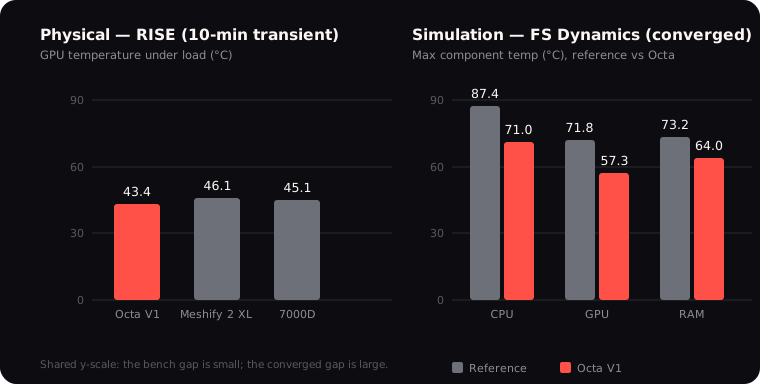
So we won't tell you the Octa V1 is definitively cooler in every build. Testing doesn't work that way, and anyone who tells you otherwise is selling you something. Here's the mechanism, here's our data from both methods, and here's how we read it. You decide.
Sources that back what CFD is and why it controls variables, and the thermal-mass / equilibrium point behind the pot analogy
Everything above applies to your current rig, regardless of what case you own.
If you take one thing from this page, make it this: clear the path. The difference between a well-configured and a poorly configured case of equal quality can be significant. Here's what actually moves the needle:
None of this requires a new case. All of it makes a real difference.
Sources that back slight-positive pressure, fan placement, and clogged-filter airflow loss
Not automatically. More fans help if they're moving air through a clear path across your components. If you add fans without thinking about intake vs. exhaust balance or whether the airflow actually reaches your CPU and GPU, you can end up with turbulence, pressure imbalances, or air that recirculates without doing useful work. More fans, well-placed, are better. More fans randomly added are not reliably better.
Positive pressure means more air coming in than going out: your intake fans collectively move more CFM than your exhaust fans. Negative pressure is the reverse. Slight positive pressure is generally preferred because it means air enters through your filtered intakes rather than through unfiltered gaps in the case. The difference is measurable in dust accumulation over time, which directly affects long-term airflow and component longevity.
A clean dust filter has a minor effect on airflow: fine mesh adds a small amount of resistance. A dirty dust filter can significantly restrict airflow. The answer is: keep your filters clean, and the trade-off (slightly reduced flow vs. meaningfully less dust ingestion) is worth it in almost every scenario.
Shape determines the path air takes through your system: where it enters, what it passes over, and how it exits. Path determines efficiency. Efficiency determines temperatures. So yes, shape matters, though it's one of several variables alongside fan quality, fan placement, and component layout. The reason it doesn't get talked about as much is that, until recently, every case was essentially the same shape. There wasn't much to compare.
Yes, within the limits described above. The relationship between temperature and electronics longevity is well-established in reliability engineering. The Arrhenius-derived rule of thumb (roughly doubling component lifespan per 10°C reduction) is strongest for capacitors and other thermally sensitive components. Even modest temperature reductions produce measurable improvements in expected lifespan. It's not a guarantee against other failure modes, but temperature is one of the few factors in hardware longevity that you can actually influence.
Sources that back the pressure, more-fans, and lifespan answers
Here's the TL;DR version:
The PC case was invented for office work more than 40 years ago. It's certainly gotten some improvements over the years. But the shape itself, the rectangle, is rarely part of that conversation. Air has rules. The rectangle wasn't designed to follow them. Most of the workarounds we see in modern case design exist because the shape wasn't the starting point.
We made it the starting point. The Octa V1 was born from that.
But…
The Octa V1 is not the end boss.
It's not the final shape of PC cases, it's our proof that there was something out there worth exploring. We challenged a 40-year-old design to show there are other ways to do it, because that's what this brand is about.
We believe innovation isn't linear, it branches. If the world had only kept improving the horse and wagon, we'd still be riding them today. Someone had to ask: do we really need the horse?
Olicus is here to build the best products we possibly can in tech and gaming, one product at a time.
Explore the Unknown.

// Explore the Unknown
© 2026 Olicus Technology & Gaming AB. All rights reserved.
Explorers of the Unknown